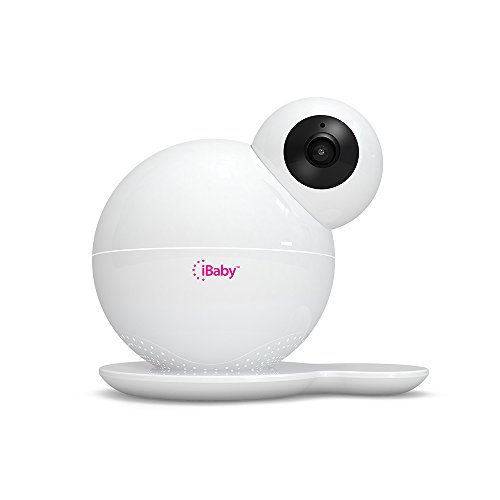
I ordered this monitor several months ago, so we've had it for a bit.
The first thing you notice is the packaging. The packaging is fantastic. It's very secure and it arrives in a very stylish, trendy box that's cube shaped and sturdy. This is iPhone level packaging and presentation. Compared to some of the other monitors we looked at and tried, I was very impressed. In fact, I saved the box in case we needed to store it and so it would have a safe place when we moved.
We had no trouble with set up at all. It latched right onto our wifi with no difficulty.
The 1080 video quality does not come as the default. You'll need to adjust the settings. After that it is very clear.
I love the fact that we can use it with our phone. That's why we got it in the first place. Carrying around an extra device seemed like a tedious concept when we already had the phones with us. Plus, I can tune in and use the mic and speaker to talk to my husband when I'm not home and vice versa when one of us is out and the other is home with the baby. We've done that several times. We did have trouble once while he was out of state because of poor signal quality on the phone's end, but other than that it's been wonderful.
The base that you see under the monitor has little teeth to hold it, but a magnet the keeps it secure also.
We don't use the music much, but it's a nice feature and doesn't sound obnoxious like some baby gear does. We can also use our own music if we need to and I expect that will be useful in the future as our little guy gets older.
An unexpected benefit also came from the camera when we were gone for two weeks on vacation. I set the camera up in the main room of the house and it allowed me to keep an eye on everything. When I felt anxious or homesick, I'd just open the app, look around the house through the monitor, and know that all was safe and well. The night vision made it work no matter what time of day I felt nervous.
I'm definitely glad this is the monitor we settled on when we were trying to choose.
UPDATE: I am really appreciating the air quality monitor that lets me see the temperature and VOC that let's me know how the air quality is doing.
The night vision is awesome. It works really well and very clearly.
Keep in mind when using the unit that it won't be as effective if you have a bad internet connection (or lack of one). If you want to check in on baby and grandmama while you're at work and the internet is down, you won't be able to. Likewise, a poor connection is going to give you spotty, if any, coverage.
The good news:
It works exactly as advertised. 1080p video stream from the phone app, still image and video recordings also done through the app. Night vision is decent. Swipe to tilt is pretty cool. You can also play some soothing music from the app and have it playback from the camera speaker. The website says that the app is only supported on mobile phones and not tablets, but there may be a way around this... I am running the Android version of the app and I am happy to report it works very well with no hiccups as others have posted.
Things/caveats to know (as of app version 2.5.3 and camera firmware version 1.9.2) :
1. The app has a 32-character limit (alphanumeric and symbols) for the WiFi password it sends to the camera at initial setup. If your WiFi is secured with anything longer, the app will never connect to the camera.I tried this for several hours only to discover this is why it wouldn't connect out of the box.
2. There is no way to manually set any network config on the camera itself. The camera boots with some sort of multicast server listening for a join. The app on your phone both multicasts and broadcasts out across the network looking for the camera. Once it finds it and does a join, it sends it the WiFi SSID and key that the app has your configure over to the camera. The camera then joins the WiFi network and sends out a DHCP request for an IP. The only way to manually hard-code an IP address for the camera is to create a DHCP reservation on your router once it completes this process the first time. The app has no configurable settings to send to the camera to change its network config.
3. Be sure your home router has a firewall enabled. An nmap scan thrown at the camera shows that it has a telnet service running on it:
PORT STATE SERVICE VERSION
23/tcp open telnet BusyBox telnetd
The telnet server seems to have a username/password enabled, so just something to be aware of. Never connect this or other IoT devices to an unprotected Internet connection.
4. The voice volume sent to the phone from the app is quite low. I'm not sure if this is a firmware bug or if the internal speaker is just underpowered. It is audible, but don't expect it to act as a loudspeaker for the room. It just isn't that powerful.
After reviewing countless reviews about this product, two factors came into mind as to why this may receive less than sub-optimal reviews/ratings. One: internet speed needs to be fast (please refer to below for more details). Two: The app freezing may have to do more with your mobile device's ability to process things from a hardware/app perspective (i.e. if you are running this on an older mobile device w/ less than sub par hardware and an obsolete operating system, be it android or ios, and without the latest updates, you will be having issues) OR your internet connection again is not great and there's a lot of distance/barriers between your mobile device and the wireless router.
With the forewarning mentioned above. Let's get down as to why this monitoring system is excellent:
-Installation was a breeze. Follow what the manual has to say which has about only 2 steps for you to do. The "syncing" of the baby monitor with phone and app does it pretty much for you. It's almost a "plug and play" idea
-360 degree rotation and 110 degree tilt, check that off as amazing. Even better is that it has this semi "fish eye" lens, meaning it can see more to the sides compared to a normal lens. For me this is a big plus because I can see more.
-Temp/Humidity/air quality sensor is a bonus
-alerts and other app abilities are intuitive as if whoever designed this baby monitor actually hired a UX/UI (user experience/user interface) designer and said "how do we make this more user friendly"? <--my wife is a ux/ui designer and if it gets her nod, i'll take her word over some joe schmoe like me.
-The fact this camera has night vision is pretty cool and can auto switch from a room with light to without makes it that much better when you are panning left/right, zooming in/out of certain areas (please refer to videos 1 and 2)
-preprogrammed lullabies, white noise background, music, short stories all part of the app!
-The ability to take photos or record videos to be saved and sent to others is also a great idea.
-Zoom in/out with this video monitor is sweet.
-I love the fact that there is not an extra piece of hardware, to watch the baby, everything goes through your phone or whatever mobile device you may have,
-Ability to have 2 way talk is amazing! Since our baby is a newborn the two way talk does not really have its usability at the moment BUT it has let our dog in check. I sometimes will set this aby monitor in our dining room/kitchen/sun room area where our mischievous German Shorthair Pointer (GSP) sometimes raids the kitchen and trash cans for food. With 2 way talk, I can talk to him, and he will have this look of "I can't believe daddy caught me!". Yes I've caught him red handed a couple times already trying to eat quiche off our island in the kitchen.
*I am fortunate enough that in my neighborhood we have fiber optic cable laid down. I am currently with Frontier Communication and pay about $25/mo for fiber optic 25mbps speeds. This means, that I am not "sharing" my internet connection and being throttled down by other houses because all that speed is in my house. If I am in the same room and close to my router, 1080p streaming is no problem at all. If I am at a longer distance (in the master bedroom on the opposite end of the house with several wall barriers), I will usually throttle down the video quality to 640 or 720p, which I am fully content with its video quality. If I were to ever upgrade to the 50mbps or 100mbps, fiber optic speeds, this would handle 1080p without any bumps or bruises. By the way while recording video 1 for this review, I had "House of Cards" playing @ ultra hd4k playing on the same band as the iBaby monitor, and me playing some video game online w/ my laptop. Video 2 takes place on the other side of the house doing a tilt and 360 view @ 1080p, video compression though is not the greatest when saved as a video file (what I am uploading on amazon review). But viewing it on the phone was a lot clearer. ALSO do take note, my muffled or less than stellar sound of my voice is being picked up from the baby monitor and not the phone itself. As I was at a great distance and could pick up my voice at normal volume (video 2 my voice is more elevated) I think speaks volumes to its quality to pick noise at greater distance.
Lastly, this system can have multiple cameras. I am already going to buy a 2nd baby monitor so I can switch to the nursery room upstairs and have one dedicated for my first floor.
I would definitely buy this again at this price point. But again, for future buyers of this iBaby M6S, make sure the 2 things mentioned in the beginning are gladly optimized.
We purchased this for our nursery and in general I do like it and the iBaby app, though I think it's slightly overpriced or it should include the wall mount (explanation below). It was easy to set up and the app is easy to use. I don't often have connectivity issues like some other reviewers. It consistently works well on both a wireless and 4G network. When I do have connectivity issues, I close and reopen the app and it refreshes. I like how it shows the temperature in the nursery, though I question the air quality alert at times. It will say superb most of the time, then it will switch to poor for a few moments before going back to superb. I've learned to not worry about that detail. Things I do not like about it: when the camera's night vision is on auto, there's an audible clicking sound when it's switching back and forth between night vision and the regular camera. Sometimes it clicks several times when it can't decide to turn night vision on or off in a dim room. So I turned the night vision to on instead of auto, to get rid of the clicking sound and therefore it's always in black and white. The image quality when the night vision isn't in use is really good, so it's too bad that I never see it due to changing this setting. For the price, I think it should include a wall mount. The way it's designed, it needs to be elevated to get a good view of the entire crib. I think the wall mount is also overpriced, so I have the monitor sitting on a stack of books on a nearby bookshelf and it works well enough but it's not ideal. I'm also a little surprised that the camera has so much movement capability, but it's movement when pointing down is quite limited. It's as if they designed it so that the customer would have to purchase the wall mount for an unobstructed view of the crib. The only way the wall mount wouldn't be needed is if you had it set at a slight angle on a high shelf (2-3 feet from the ceiling) facing the crib. The design is neat though a little bigger than I expected, and it comes in a very Apple product-like box.
I did a ton of research on baby monitors over the last few months. I had a couple of key items that were important: Great video, two way audio and as much coverage via pan and scan functionality. The iBaby M6S hit all of those and more. So far it's spectacular.
Pros: The video quality is off the charts in both day and night or variations in light quality. Two way audio is also quite good. One nice surprise was the amount of sounds you can play through the monitor. The white noise choices are great, and the types of ambient sounds are both nice in quality and variety. Also nice are the temperature, humidity and air quality sensors. This camera replaces several other gadgets that are no where near necessary, but interesting to have nonetheless. The camera has a great field of view, and with the ability to scan and zoom via the app you can cover the entire room. Setup was complete in less than 10 minutes.
Cons: The app is somewhat sluggish, but definitely works. Connecting from a distant site (from my office around 15 miles from home) results in a moderate delay in camera view. But this is super nit picky as I'm watching what's going on in my house from 15 miles away in near real time - 1st world problems. The other complaint is that the system alerts that you can configure via the app are so sensitive that they're worthless. The only alert I kept was the temperature alert. Sound and motion went off even at the least sensitive setting at even the slightest blip. That was kind of frustrating.
Overall this is a superb camera with excellent video quality and lots of bells and whistles.

Feature Product
- 1080p HD Video Quality - Full HD baby monitor with crystal clear video resolution, night vision with Near-invisible infrared LEDs let you see your baby clearly even in total darkness .
- Smart Nursery Features - Play thousands of lullabies & bed time stories for baby education and pacification, listen & talk, snap pictures, record videos, grow-up timeline ,temperature & humidity Sensors and air Sensors, help you better nurse your baby.
- Two-Way Wireless Talk - Comfort and talk to your baby from anywhere, whether you're at the office or in the living room
- Instant Smart Alerts -With the help of WiFi baby monitor, every PIR sensors. Monitor and control all features anytime from your smart phone otential risk will be identified accurately and sent to you immediately.
- Good quality, Fast connect and free cloud storage-Apple company certified product, Unique MFI connection technology for ios faster than any wifi connection in market, free record cloud storage. Enable your router's SSID broadcasting and DHCP SRV
Description
This Baby Monitor Will Steal Your Heart
iBaby Monitor M6s was created to make parents’ lives easier. With 1080p HD video, night vision, 360° view, and smart alerts, you will always know exactly how your baby is doing. Thanks to two-way audio and echo cancelation, you will be able to hear your child and talk to her through your mobile device. You can also play lullabies from the music library, and record your own.
This really came in handy my only complaint would be there is a slight buzzing noise like a fan is on so his voice kind of vibrates. Weird I know. Plus I'm not trying to pull it apart but to be honest , I have to turn off the automatic night vision...
Just because at a certain time of day it will click on and off and that can drive ya nuts when you are watching you're baby.
I wished when I spoke through my phone to this it was a little louder and I didnt have to tell for someone to hear me. But I dont use it that much anyways. Yettt...
In reality overall it is actually not a bad product. Feels like a luxury to own the positive side is
To me this is a major upgrade to just regular walkie talkies LOL baby monitors in other words.
My most favorite part is the fact I can swivel it back and forth and I can do so much more with it when it comes to sound or music. Plus the small settings that let me adjust it to my personal preference. The picture isn't bad and our internet is actually great but at 180 it still shows 720p in my opinion but that still spectacular picture plus I love the fact that it's zooms in and out.
One thing I wish it did was instead of telling me if my air quality was good great or bad was give me a little bit more detail on what is bad or what is okay what does it smell in other words but overall no major complaints it does do what it says.. thanks
Great camera. Could be better if the manual stated how to make users in the phone.. you should make one user and then invite people to join (we created a few users and it got stuck). The quality of the picture is good enough and the rotation angle of the camera is very comfortable. It has a very sleek and nice design.. it is white so it kind of disappears in the wall of your nursery. The option to talk and play music to the baby is awesome and the sound is great.
When I first tried to set this up, it was very frustrating - the connection to my Android phone kept failing. I contacted tech support, and while their instructions were complicated, and didn't quite work the first time, I was finally able to get the system set up. Part of the issue appears to be that it is necessary to disable mobile data (4G) on the phone while establishing the first connection - once that is done, mobile data can be re-enabled.
Because of the initial connection issues, I've dropped the rating to 4 stars, but other than that I'm happy with it so far - although I wish it could pan down a little more.
One thing - I saw some reviews saying that this is not Web enabled, and I thought that meant it was only view-able for devices connected to the same WiFi. Well, I was away from home earlier today and opened the app, and was surprised to see live video. For some, this will be a big plus. For others, this adds a security risk that they don't want. My feelings are mixed - but I will be bumping up the complexity of the password now that I've realized it is not limited to our WiFi.
This (iBaby M6S) is our second iBaby monitor, and is a vast improvement over the M6T in terms of connectivity, picture quality, and sound. Though I haven't tried the M7, I imagine further improvements to the above would be marginal and, in my opinion, not worth a significantly higher asking price.
I've scouted the reviews for a lot of big name baby monitors, and originally picked iBaby because it broadcasts to my mobile phone no matter where I am in the world, and seemed to have the least complaints and negative reviews. This model and its predecessors still get their share of negative reviews, however, and they tend to be in one of three categories:
1. It sucks my mobile phone's battery
2. It doesn't connect/drops connection
3. Setup is hard
To that I would respond:
1. Duh. This monitor streams HD video over the internet, with active alert monitoring. Of course it sucks your battery, and so does YouTube at HD resolution. However, my iPhone 6S can last well over the length of dinner and a movie with the iBaby video and sound both broadcasting, and if that's not enough, I plug in my phone.
2. See #1. iBaby doesn't seem to have a very effective automatic video resolution degradation adjustment, and this does result in bad connectivity when the home wifi signal flutters. I imagine this is particularly prevalent in the US, where most people's real-life internet performance is pretty bad (Mr. President, regulate the ISPs or break up their monopolies). iBaby should recover faster when this happens, without requiring me to kill the app. However, my internet consistently clocks in around 400 MBpS and I almost never have a problem.
3. Read the manual? Setup (and general usage) isn't the most intuitive ever, but it isn't far off. A quick browse of the "quick setup guide" and you should be set. The only problem I experienced (with both my iBaby monitors) is that for some reason, it has to be set up in the same room, accessing the same wifi router, that it will be permanently stationed.
Overall I'm very happy with the M6S and would recommend it to anybody with a strong internet connection and without unrealistic expectations on mobile phone battery life. It's proven to be reliable, it's easy to use, and it keeps my wife and I connected to our newborn, even when we travel. It has great-looking night vision. It's also cute-looking and the temperature and humidity sensors, while of questionable accuracy, at least give me a useful relative gauge of how warm and humid the room is.
A few additional minor niggles:
1. It can't be connected by LAN line. This would certainly aid connectivity stability.
2. It doesn't tilt down far enough to mount on a high shelf overlooking the crib. Apparently the iBaby 7 has more tilt.
3. The least sensitive alert settings are still too sensitive.
4. The night vision transition makes an audible clicking sound. And, when the room is roughly at the borderline level of brightness between day mode and night mode, it can quickly flip in and out of night vision and sounds like an angry insect. Passing clouds can also cause these needless, distracting clicks.
We got this for our first child as a gift. We wanted something I could check on my phone while working night shift. Picture quality is amazing! I can see her belly rise and fall with each breath. Sound quality is also good. I can't say much for durability except that we have dropped it once or twice and nothing happened to it.
Only negative is that I have trouble connecting while at work. Someone it takes a few minutes and sometimes I am not able to connect at all. We live about 1 mile from my work, not sure how much that matters. Maybe it is just the slow network in the building. I never use wifi at work (I've tried and that is even slower than just using data)
Either way, it was worth the money and we bought a second one for our next child.

0 comments:
Post a Comment