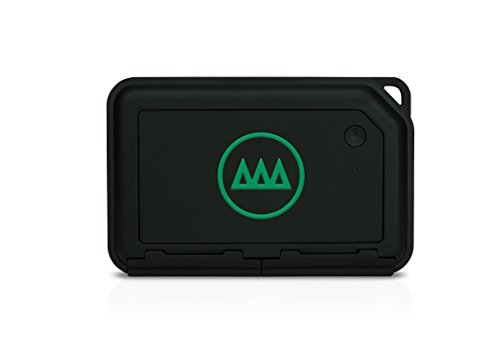
Ok, i’ve Not had my Gnarbox long and am still finding my way around but so far I love what I see. I run a small B&B and accompany guests on motorcycle ride outs, skiing etc. I normally have a few GoPros with me. The cameras are running most of the day generating hours of unwanted footage. I like being able to edit out that unwanted footage while it is still fresh in my mind during say a coffee stop rather than wade through it at a later date when I have to go through it all again. Being able to pick out a few high lights to post on Social Media at the time is also a bonus. I know you can do it with GoPro Quick etc, but you still have to wade through all the footage and transferring large files from a GoPro to my phone via WiFi during a coffee break isn’t really an option. You can do that on the Gnarbox, edit in 4K and just transfer the bare minimum for uploading - brilliant.The Gnarbox has some neat editing features for both video and photo. I’d like to see more such as Video Transitions but the Firmware updates are ongoing so fingers crossed.
The Gnarbox itself is well built and has a Tactile feel. Battery life seems good although I am always topping my mobile deviices up from a Power Pack or two so never run short on battery life.
With me space is a premium and even on overnight or longer trips a Lap Top has given way to an iPad mini. This was a problem when it came to basic video management.The Gnarbox has solved that in one go, even allowing me to edit in 4K to boot.
Mine is the smaller 128gb version but I have paired it with a popular brand mini 500gb SSD which solves that issue and takes up no space to speak of.
Built in Card readers, USB 3, USB C are great features to compliment the latest Tech and get the most out of it. Then, when I do get home being able to plug straight in to my Desk Top and treat it like a Hard Drive makes transferring the saved content a breeze.
At the moment I have no idea how it will cope with sub zero temperatures as our ski season is still some weeks away but I have my fingers crossed that it will Not let me down. I’ll update when I find out.
I love it when a product comes along and is not only well thought out and exceptionally executed but also goes above and beyond my expectations.
I went out on a limb and purchased the Gnarbox based on a few reputable online reviews and it has quickly become an integral part of my photography and video kit allowing me to leave my laptop at home for most jobs. It's intuitive to use and built like a tank and the one time I needed help support was quick to respond. I'm heading out on the road for 2 weeks tomorrow and my Gnarbox is already packed. I would give this product 6 stars if i could. Keep up the great work Gnarbox!
Killer way to edit video. Mine tends to struggle with editing video that is 10min. It is a very functional mobile storage transfer system. The editing is a bit hit and miss. With that stated, I would buy it over again given it's portability, durability and convince. I hope the firmware upgrades address the bugs and the software is better for editing. DO NOT PURCHASE if you want to use it as a primary editor. It is way to limited.
I freaking love this thing! If you find you're the kind of person who is always running around with a DLSR Camera, GoPro, Drone, or other Video/Photo Camera, this is going to-change-your-life. The integration with Lightroom Mobile makes it easy to get those early, awesome Pictures and Videos edited and online, so your friends and family can be envious of yet another adventure. While I love my Laptop, I am always worried about schlepping it in the outdoors. Now I have a piece of gear that I can toss in my Backpack without a care.
Pros: Solid hardware, reliable, pretty good battery life. Cons: Needs proper tablet app, slow processing of video, lots of bugs, non repeatable errors when processing video, can't handle time lapse videos from my Sony cameras.

Feature Product
- Compatible with Action Cameras, DSLRs, and Drones. GNARBOX is compatible with Android and iOS phones and tablets. It does not work with Windows based mobile devices
- Currently, tablet applications are not optimized or customized. Back up 128GB of footage at up to 4GB/min to the GNARBOX, then auto-organize your footage by date and camera. Edit and share 4K videos and RAW photos from mobile phone or tablet
- Intel Quad-Core CPU and HD graphics GPU
- 4GB per minute backup via USB3, SD, microSD
- 128GB internal flash storage or connect your external drive
Description
GNARBOX is a portable backup & editing system for any camera, allowing you to backup, edit and share your footage anywhere via phone app. USB3.0, microSD and SD ports allow you to connect any camera to quickly access and manage your content. Connect an external SD/HD for additional space. GNARBOX is rugged - shockproof, dustproof and ready for your adventure. Never lose your best moments again. GNARBOX has a 4000mAh battery, so you can use it for 4-6 hours on a single charge. Run out of juice? Recharge using micros. Here's how it works: Back up 128GB of footage at up to 4GB/min to the GNARBOX, then auto-organize your footage by time, type, GPS and relevant metadata tagging. Open the GNARBOX app on your phone to start editing instantly, from 4K video to .RAW photo. Create highlight reels on the go with full creative control. Upload your media and share it with the world from the convenience of your phone. GNARBOX lets you upload in full resolution directly to your phone in 720p, 1080p, 2.7K and 4K.
Got this through there Kick Starter Campaign, waited over 2 years. I have been using the GNARBOX for about 3 weeks, I use it everyday...edited images in the snow in Rocky Mountain Nation Park at 12k, airports, on a bus, restaurants, clients office....does it work ? Yes... but it has quirks that the company is working on fixing...
The good.
Great field backup device, best I have ever used. I simply back up my memory cards to it and view all images on my ipad, RAW images work perfect... You can even do minor edits like to your photos. Save them back to your ipad and post them when you have wifi or use a cell connection on your phone. 4K videos play back smooth, again you can do minor edits, even color correct them now.
The device seems water resistant when the doors are closed and it is light and compact enough. Pairing with an Ipad mini or iphone 7+ is perfect. It does heat up but really not issue as there is no physical connection. Battery last about 2-3 hours depending on what i'm doing. Certainly long enough to view what i shot and make a keeper shot list.
The last update stated they are working on iphone images backups, nice but not really what I bought it for.
The Bad/ or needs software fixing
****SOFTWARE UPGRADES you need a cell connection, I hate this one, no way to do it over wifi, also no wifi pass through.. My ipad has no cell service**** this needs to be fixed first
- image rotation needs finer controls
- applying luts would be nice...or some sort of general CC that can be applied to multiple images
- navigation through images is cumbersome, it goes by type, date then you get the grid index of images, when you select a single images you cannot go back to the grid....
- curves tool or at least histogram with levels needed
- the entire interface seems like a beta, very poor scaling and not intuitive like some other ipad image editing apps
Hardware
- One minor grip would be some way to store the cable on the device, i use tape now... My lacie backup drives have this makes travel easier knowing you didn't forget the cable
Over all I like it. It plays back everything I throw at it with smooth speed. With some interface polish and wifi passthrough this will get 5 stars in my book. Great Job!!!!
Must have for travel photography. I link it to my phone/iPad. Easy & fast to upload or send wherever.
Easy to use and extremely portable. The gnarbox does not add a lot to the items needed to carry but adds a lot to the functionality of them.
I purchased the GNARBOX with the GoPro Hero 5 for my wife’s birthday. Neither of us have any experience with shooting or editing videos, but the GNARBOX made it like a video game and really easy! After putting the kids down we both watched the footage from our Yosemite trip, made a video and posted on Facebook. It definitely took about 30 minutes or so the first time, but after that it’s easy and fast. Looking forward to making more videos of my daughter and son.
First Impression:
- high quality
- Rugged feel
- Well made
- Small
- Took ~30 minutes to learn
The Good:
- Works great with GoPro
- No laptops on family trips
- Backup to hard drive
- really Fast updates
- Good support
The Bad:
- Sometimes need to reset
- Gets hot
- a bit of a Learning curve on software
Easy to take GNARBOX anywhere, just like bringing another portable Hdrive with more feature than storing hotos. Some improvements would be nice for the next generation: may be a lcd screen or printer-add on part. Also expected more powerful editing somewhere.

0 comments:
Post a Comment